

The latest version of Clock APK (v2.34) is available to download. Alarm, clock, timer and stopwatch mode This app works on Android phones and tablets.
About Clock APK
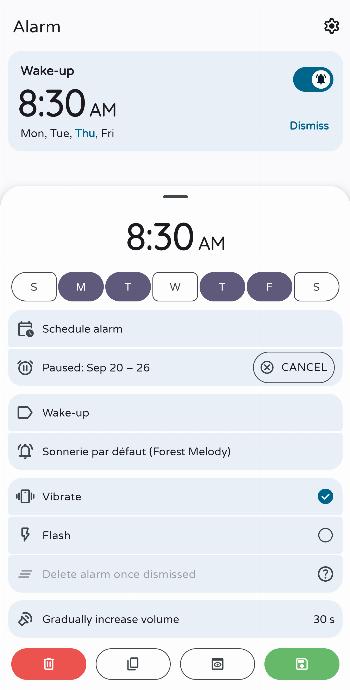
Clock is a privacy-conscious open-source clock, based on AOSP. Does not use internet permission, and thus is 100% offline. Features: Set alarms to a specific date; Set alarms to a specific time zone; To dismiss or snooze alarms: Support for flip and shake actions; Use the power button or volume buttons; Solve math problems. For some Snapdragon devices only, the alarm is triggered when they are switched off Unfortunately, this feature may not work on some devices despite the presence of the "com.qualcomm.qti.poweroffalarm" system app. Advanced alarm sorting; Swipe to delete an alarm; Duplicate alarms; Customizable alarm title; Customizable ringtone; Ability to play ringtones randomly; Light, dark or system theme; AMOLED mode for dark theme; Customizable interface; Digital or analog clock style; Display home time when traveling; Display the time in many cities around the world; Timer and stopwatch included; Support for live update notifications for timers and the stopwatch; Possibility of sharing your stopwatch with your contacts; Customizable screensaver;…
Clock APK was developed by BlackyHawky and is available under the GPL-3.0-only open-source license. This means the source code is public and anyone can inspect it. If you like Time apps, you can also browse more apps in this category.
Clock APK Information
| App Name | Clock |
| Package | com.best.deskclock |
| Version | 2.34 |
| Size | 7 MB |
| Requires | Android 6.0 and up |
| Category | Time |
| Developer | BlackyHawky |
| License | GPL-3.0-only |
| Source | IzzyOnDroid |
| Last Updated | October 16, 2026 |
How to Install Clock APK on Android
- Download the Clock APK file using the button above.
- Open your phone Settings and allow “Install unknown apps” for your browser or file manager.
- Tap the downloaded APK file and press Install.
- After installation, open Clock from your app drawer.
Why Download Clock APK from Here?
We link Clock APK directly from IzzyOnDroid, so the file is original and we make no changes to it. Whenever a new version is released, this page is updated automatically, so you always get the latest Clock APK.
Frequently Asked Questions
Is Clock APK free?
Yes, Clock APK is free and available under the GPL-3.0-only open-source license.
Is Clock APK safe?
This file comes from the IzzyOnDroid repository, where APKs are taken from the developers' official repositories. Still, always check an app’s permissions before installing it.
Which Android version does Clock APK need?
Clock APK requires Android 6.0 and up to run.
What is the latest version of Clock APK?
The latest version is 2.34, updated on October 16, 2026.
Official page: Clock official website / source

