

The latest version of QuickTile Settings APK (v1.5.1) is available to download. Manage Private DNS & USB Debugging via Quick Tile Settings tiles & Auto-revert. This app works on Android phones and tablets.
About QuickTile Settings APK
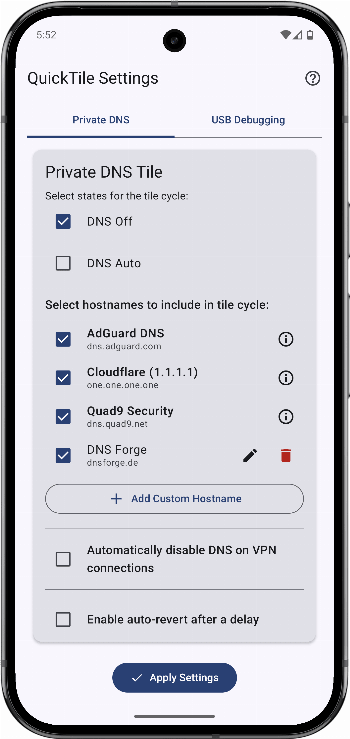
Quick-Tile Settings offers customizable Quick Settings tiles for Private DNS and USB debugging. Quickly toggle settings and auto-revert when needed. Features: Private DNS TileCycle: Off, Auto, custom hostnames Predefined providers: Cloudflare (Performance & Privacy), AdGuard (Ad/Tracker Blocking), Quad9 (Security) Add, edit, or delete custom DNS entries Select which entries appear in the cycle Optional auto-revert after a configurable delay USB Debugging TileToggle: On ↔ Off Configurable cycle or fixed states Optional auto-revert User-Friendly ConfigurationIn-app settings with tab navigation Clear ADB guidance for granting WRITE_SECURE_SETTINGS Modern UI: Jetpack Compose, Material You (Android 12+) Requirements: Android 9 (API 29) or higher WRITE_SECURE_SETTINGS permission via ADB (one-time setup) Setup & Usage: Grant ADB permission: Follow the in-app instructions for a one-time setup. Configure tiles:DNS: select Off/Auto and manage hostnames. USB Debugging: select On/Off. Set auto-revert delays as desired. Add tiles: Add "DNS" and "USB Debugging" to your Quick Settings panel. Use: Tap to toggle; long-press to open settings.
QuickTile Settings APK was developed by RBN-Apps and is available under the GPL-3.0-only open-source license. This means the source code is public and anyone can inspect it. If you like System apps, you can also browse more apps in this category.
QuickTile Settings APK Information
| App Name | QuickTile Settings |
| Package | com.rbn.qtsettings |
| Version | 1.5.1 |
| Size | 3 MB |
| Requires | Android 10 and up |
| Category | System |
| Developer | RBN-Apps |
| License | GPL-3.0-only |
| Source | IzzyOnDroid |
| Last Updated | September 21, 2026 |
Download QuickTile Settings APK v1.5.1
How to Install QuickTile Settings APK on Android
- Download the QuickTile Settings APK file using the button above.
- Open your phone Settings and allow “Install unknown apps” for your browser or file manager.
- Tap the downloaded APK file and press Install.
- After installation, open QuickTile Settings from your app drawer.
Why Download QuickTile Settings APK from Here?
We link QuickTile Settings APK directly from IzzyOnDroid, so the file is original and we make no changes to it. Whenever a new version is released, this page is updated automatically, so you always get the latest QuickTile Settings APK.
Frequently Asked Questions
Is QuickTile Settings APK free?
Yes, QuickTile Settings APK is free and available under the GPL-3.0-only open-source license.
Is QuickTile Settings APK safe?
This file comes from the IzzyOnDroid repository, where APKs are taken from the developers' official repositories. Still, always check an app’s permissions before installing it.
Which Android version does QuickTile Settings APK need?
QuickTile Settings APK requires Android 10 and up to run.
What is the latest version of QuickTile Settings APK?
The latest version is 1.5.1, updated on September 21, 2026.
Official page: QuickTile Settings official website / source

